Spectrum TV
- 4.7
- Rating
- 10.00M
- Installs
- Free
- Price
 Analysis by App-foxy
I like television apps that understand their job: get me to live programming quickly, let me find something worth watching without a fight, and stay useful when I do not want to sit in front of a traditional receiver. Spectrum TV is built around that straightforward idea. It is an entertainment app from Charter/Spectrum for watching television through live channels and On Demand programming, and in everyday use it feels most valuable when I already have Spectrum service and want a more flexible way to watch.
The app is free to download, but that does not make it a universal replacement for a paid television subscription. Its usefulness depends heavily on the Spectrum account and service available to the household. That distinction matters before installing it: this is not a general free-streaming catalog where anyone can open the app and browse a large library. I see it more as a companion to Spectrum television, turning an Android device into another viewing point around the home.
Its long presence in the category is reflected in the release history, beginning on November 29, 2011. The current Android build is version 10.2.0.267627118.release, and it supports Android 6.0 or later. That broad operating-system requirement makes it accessible on many older phones and tablets, although the quality of the experience will still depend on the device, connection, and account setup. The app carries a Teen content rating, so it is worth keeping the intended audience in mind when handing a device to younger viewers.
You May Also Like

 Blood Strike: 2.5 Anniversary
Blood Strike’s Loadouts Turn Every Drop Into a Tactical Gamble
A close look at Blood Strike’s custom loadouts: how fast access to signature weapons reshapes its battle royale rhythm, rewards preparation, and narrows the gap between fights.

 Pandora - Music & Podcasts
Pandora’s Music Is Easy to Start, but Harder to Recover
Pandora’s strength is its low-effort path from a seed to a station. Its weak spot is how much confidence it asks you to place in connection, setup, and quiet recovery.

 8 Ball Pool
 Is Built on Rivalries, Rematches, and Routine
A close look at the rivalries, rematches, shared routines, and unanswered safety questions that turn a quick pool match into a persistent mobile community.

 Samsung Music
’s Quiet Strength Is Playing What You Already Own
Its reach comes less from spectacle than from dependable access to a personal library. That simplicity is both the app’s strongest retention engine and its ceiling.

 AccuWeather: Weather Radar
AccuWeather Review: A Quick, Clear Forecast for Everyday Decisions
For everyday plans, the best forecast is the one you can understand quickly. AccuWeather makes rain timing, radar, and local conditions easy to act on, with a few trade-offs.

 Hill Climb Racing
Why Hill Climb Racing Still Turns Crashes Into One More Run
A tiny car, a bumpy hill and one more upgrade: Hill Climb Racing keeps resurfacing because its simple chaos makes every near-miss feel personal.
More From Our News Desk
View All News


How I use Spectrum TV from the first launch to regular viewing
I begin by treating the first launch as an account check, not a test of the whole service: I sign in with the Spectrum account I expect to use, then try one familiar live option before settling in. That gives me a clear baseline for regular viewing and makes it easier to tell whether a later snag is about access, a particular program, or the connection.
The baseline workflow is simple, but the account comes first
My normal routine starts with signing in rather than browsing. Once the account is ready, I use the app in two main ways: live television when I want to join a program already in progress, and On Demand when I want more control over what starts next. That split is more important than it sounds. Live viewing rewards speed, while On Demand rewards browsing and planning, so I do not approach both sections in exactly the same way.
For a quick evening check, I go straight to the live area and look for something already airing. This is the app's most natural use case when I am cooking, waiting for someone, or moving between rooms with a phone or tablet. I do not have to occupy the main television to catch a program, and that small convenience is where the app earns its place for me. It is less about replacing every viewing habit and more about adding another practical screen.
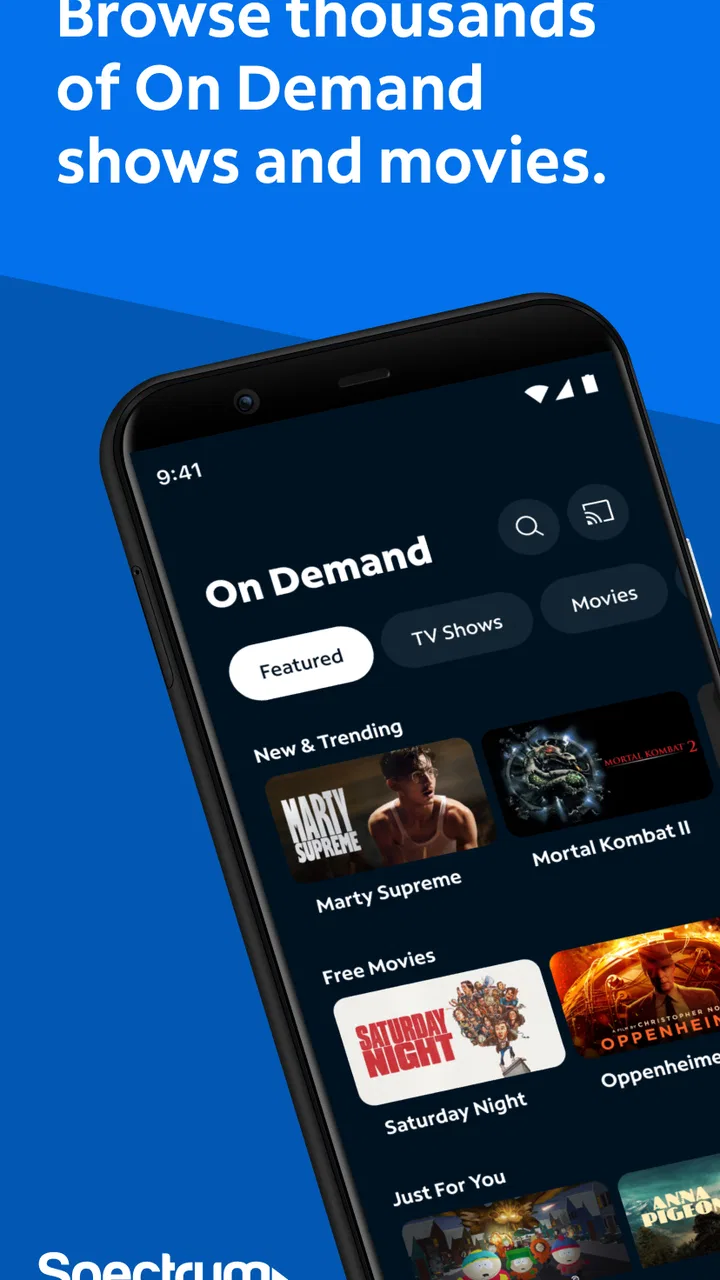
When I have a particular show in mind, On Demand is the better starting point. I can browse with a specific goal instead of treating the app like a random channel hopper. My advice is to decide first whether I want “something live” or “this particular program.” That one choice avoids a lot of aimless scrolling and makes the interface feel faster, even when the connection or catalog takes a moment to respond.
A realistic example is a shared household where one person is using the television for a movie while I want to keep up with a live program elsewhere. Spectrum TV can be useful on a tablet in that situation, especially when the second screen is being used for short sessions rather than a full day of viewing. It also works well for checking television while traveling around the house, though I would not assume that every viewing situation outside the home will behave exactly like viewing on the home network.
What I check before blaming the app
When playback does not start, I first check the basics that are easy to overlook: whether I am signed into the intended Spectrum account, whether the connection is stable, and whether the app is current. A television app can appear broken when the real problem is an expired session or a weak wireless signal. Reopening the app after confirming those points is often more sensible than immediately reinstalling it.
I also pay attention to the difference between a channel problem and an app problem. If one live option fails but other areas load, I treat that as a narrower issue rather than assuming the entire application is unusable. On Demand can be a useful comparison point because it tells me whether the problem affects playback generally or only a particular live stream. This simple diagnostic habit saves time and gives support a clearer description if I need help.
The most useful habit is separating account access, channel availability, and playback quality into three different checks. They can feel like one problem on a phone screen, but they are not the same thing. I check them in that order: account first, content access second, connection and playback third.
Settings and device habits worth checking
I would not spend a long time changing settings before watching something. Instead, I check the practical items that affect a repeatable routine. Notifications are worth reviewing because television alerts can be helpful for some viewers and distracting for others. If I only use the app for occasional live viewing, I prefer a quieter setup and open it when I choose. If I rely on it for particular programs, more visible reminders may make sense.
On a phone, I also consider display brightness and battery use before settling in. A large, bright screen is pleasant for short viewing but can become inconvenient during a longer session. A tablet is usually more comfortable for extended watching, while a phone is better for quick checks and background viewing. That is not a special Spectrum feature; it is a practical difference in how the same app fits different devices.
Audio deserves attention as well. I often begin with the device volume lower than expected and then adjust it after playback starts. If I am watching in a shared room, headphones can make the app much more usable without turning the session into a full television event. I would still test the audio before settling into a program, because a silent or unexpectedly loud stream is much more annoying once I am already comfortable.
Storage is another small consideration. I do not treat Spectrum TV like a download library, so I do not install it expecting to build an offline collection for later. My workflow assumes an active connection while watching. That makes the app a good match for connected viewing, but a weaker choice for someone whose main requirement is downloading programs for flights, commutes, or places with unreliable service.
Faster patterns that make the app feel less cluttered
Experienced use is mostly about reducing unnecessary decisions. I keep a short mental list of the channels or types of programs I usually want, then use the live and On Demand areas according to that intention. If I am looking for current television, I avoid wandering through every category. If I am looking for a specific program, I start with the most direct browsing route available instead of opening live viewing first.
I also avoid repeatedly closing and reopening the app during a short session. If playback is working, I leave it alone and let the current screen do its job. If something stalls, I test one focused remedy at a time: check the connection, return to the content selection, or restart the app. Changing several things at once makes it harder to know what actually helped.
Another useful pattern is choosing the device before choosing the program. For a few minutes while preparing dinner, my phone is enough. For a longer On Demand session, I prefer a tablet or another larger screen. This sounds obvious, but it prevents the common mistake of starting a serious viewing session on the least comfortable device and then blaming the app for a limitation that is really about screen size and ergonomics.
I also recommend planning around shared bandwidth. If several people are using the same wireless network, I do not judge the app's performance from one crowded evening alone. A live stream is less forgiving than ordinary browsing because interruptions are immediately visible. When possible, I start important viewing after other heavy network activity has finished. That habit does not guarantee perfect playback, but it gives the app a fairer test.
Where Spectrum TV is stronger than ordinary alternatives
Compared with a general video platform, Spectrum TV is more useful when my goal is television rather than individually selected internet clips. The combination of live programming and On Demand viewing gives me two familiar ways to watch in one place. I do not have to treat live channels and a separate catalog as completely unrelated activities.
It also makes more sense than a standalone free streaming app for someone who already uses Spectrum television and wants continuity across screens. A generic streaming service may be better for a focused library of original shows, while a broadcast-style service may be better for viewers who only want live news or a narrow collection of channels. Spectrum TV sits between those habits: it is designed around the Spectrum television relationship, not around being an independent entertainment universe.
That strength is also its biggest limitation. If I am not a Spectrum customer, the app is unlikely to be the right first choice simply because the download itself is free. Someone seeking no-account viewing, a large free catalog, or offline playback should look elsewhere. I would also skip it if my main interest is a single subscription service with a highly curated library rather than live television plus On Demand access.
Advanced limits I would want to understand before relying on it
The app should not be judged as though it were a full replacement for every television setup. The exact viewing experience is connected to the Spectrum service and account behind it, so household expectations matter. Before making it the only way I watch, I would test the channels and On Demand options I actually care about rather than assuming that the app's general purpose guarantees access to every program I want.
I would also avoid promising myself uninterrupted viewing on every network. Mobile streaming is sensitive to wireless congestion, signal changes, and device conditions. A stable home connection is the most sensible environment for regular use. On a phone, I treat the app as convenient television access, not as a guarantee that a long session will be as comfortable or consistent as watching on a dedicated television.
Privacy and shared-device habits deserve a little common sense too. I sign out or protect access when using a device that other people regularly borrow, especially because the app is tied to a household television account. I do not leave a session open casually on a shared tablet. This is a simple precaution, but it is more relevant here than with an app that has no connection to paid household services.
The Teen rating is another reason to use judgment with younger viewers. The label does not tell me what every individual program contains, and live television changes constantly. I would not hand over the app as an unsupervised children’s viewing tool. For family use, I prefer choosing the content myself and keeping the device in a setting where I can see what is playing.
Updates can improve compatibility, but they can also change small details in navigation. With the current release installed, I would give myself a short adjustment period if a familiar control moves. I do not consider that a reason to avoid the app, but it is a reminder that a dependable routine should be based on understanding the live-versus-On Demand workflow, not on memorizing one exact button position.
Who will get the most value from it?
I think Spectrum TV is best for existing Spectrum television customers who want an additional screen, a mobile way to catch live programming, or convenient access to On Demand content. It is particularly practical in households where the main television is often occupied. A tablet on a kitchen counter, a phone during a short wait, or a second screen in another room can all be reasonable uses.
It is less suitable for someone choosing a first streaming service with no interest in Spectrum. It is also not my recommendation for a viewer whose priorities are offline downloads, a purely on-demand library, or the simplest possible free entertainment app. The free installation should not be confused with universal free access; the app's real value comes from fitting into an existing Spectrum setup.
The audience scale is substantial, with over ten million installs, and the app holds a 4.7 average from around three hundred fifty-seven thousand ratings and roughly fifty-seven thousand written reviews. Those figures suggest that many people find the basic service useful, but they do not erase the account, network, and device factors that shape individual experiences. I would use the popularity as reassurance that the app is established, not as a promise that every household will have identical results.
My verdict after building a repeatable routine
Spectrum TV is a practical companion for Spectrum households, not a universal streaming replacement. I like its clear purpose: live television when I want immediacy, On Demand when I want control, and mobile access when the main screen is unavailable. My best experiences come from using it intentionally, checking the account and connection before troubleshooting, and matching the device to the length of the viewing session.
The app is free and supports Android 6.0 or later, which lowers the barrier for many Android users. At the same time, the Teen rating, account dependence, and connection-sensitive nature of streaming mean I would still set expectations carefully. I would install it if I already used Spectrum television and wanted more flexibility. I would pass if I wanted a standalone free catalog or offline entertainment.
In the end, I see it as a useful extension of a television service rather than a product that needs to replace everything else. Once I stop treating it like a general-purpose streaming catalog and use its live and On Demand paths for the jobs they handle best, it becomes easier to navigate and more dependable in daily life. For the right household, that focused role is enough to make it worth keeping.
FAQs for Spectrum TV
01What devices are compatible with the Spectrum TV app?
The Spectrum TV app is compatible with a wide range of devices, including Android and iOS smartphones and tablets, as well as streaming devices like Roku, Apple TV, and Amazon Fire TV. Additionally, it can be accessed on smart TVs from select manufacturers. Ensure your device meets the necessary software version requirements for optimal performance.
02Do I need a Spectrum TV subscription to use the app?
Yes, a Spectrum TV subscription is required to access the app’s content. The app serves as a companion to your Spectrum service, allowing you to stream live TV, on-demand content, and DVR recordings. Users need their Spectrum credentials to log in and access the full range of features.
03What features does the Spectrum TV app offer?
The Spectrum TV app offers a variety of features, including live TV streaming, on-demand movies and shows, and the ability to manage DVR recordings. Users can also create personalized watchlists and utilize parental controls to restrict content. The app provides a user-friendly interface for seamless navigation across channels and programs.
04Can I watch shows offline using the Spectrum TV app?
As of now, the Spectrum TV app does not support offline downloads. Content streaming requires an internet connection, either via Wi-Fi or mobile data. This ensures access to the most current programming but may impact data usage if not connected to Wi-Fi.
05Are there any additional costs associated with the Spectrum TV app?
The Spectrum TV app itself does not incur extra charges beyond your regular Spectrum TV subscription. However, streaming over mobile data could result in data charges from your mobile provider. Also, certain premium channels and on-demand content might require additional subscriptions or fees, depending on your package.
Pros
- Wide range of channels available.
- User-friendly interface for easy navigation.
- High-quality streaming with minimal buffering.
- Customizable parental controls.
- Access to on-demand content and DVR.
Cons
- Requires a Spectrum subscription.
- Limited access outside home network.
- Occasional login issues reported.
- No offline download option available.
- In-app ads can be intrusive.

Spectrum TV
Gallery